
Midiocre. Online Manual
Midiocre is a chord progression workbench. You generate a progression, then push it around until it sounds like something. There is no AI in it - it works from music theory, and it shows you the theory while you work.
This page explains every control and, where it matters, the rule behind it. You don’t have to read it in order, just find the part you need.
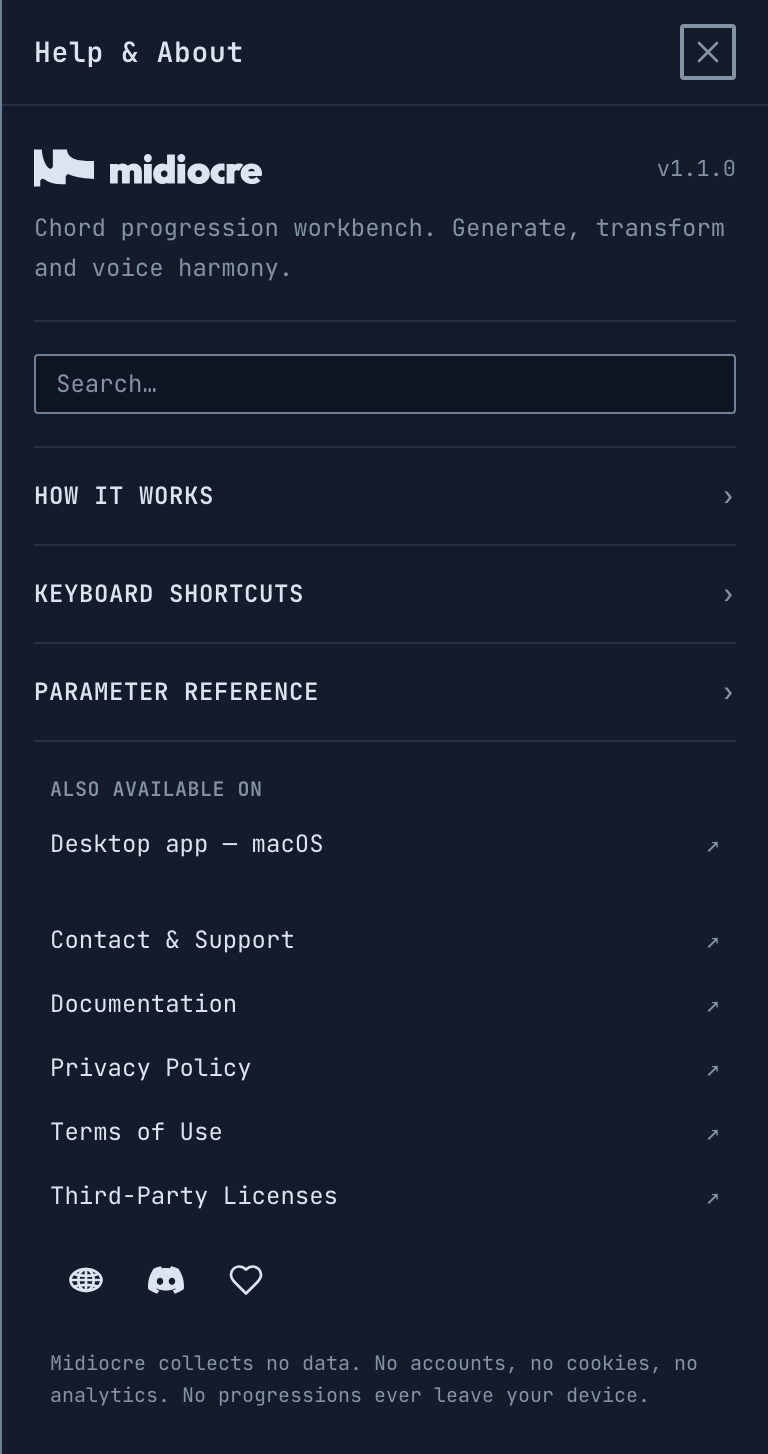
Every control also explains itself inside the app. Click the ? button or press F1 to open Help & About, where you’ll find a searchable list of all the parameters and the keyboard shortcuts for your platform.
Getting Midiocre
Web. Open midiocre.dustyroom.com. Nothing to install. You can add it to your home screen or dock it as an app, and it keeps working offline.
macOS. Get it from the Mac App Store, or download the .dmg from the Midiocre page, open it and drag Midiocre to the Applications folder. Either way it’s a standalone app, and MIDI hardware works there without depending on a particular browser (see MIDI hardware).
Note. The Mac App Store and .dmg versions store your work separately, so switching from one to the other starts you with an empty progression list. Before you switch, hit SHARE to get a link, then PASTE it once in the new install to carry your progression over.
Windows. Download the .exe installer from the Midiocre page and run it. MIDI hardware works the same way it does on macOS, without depending on a particular browser (see MIDI hardware).
Note. The Windows build isn’t code-signed yet, so the first time you run the installer Windows SmartScreen will say “Windows protected your PC” and offer only a Don’t run button. The More info link above it is easy to miss - click that, then Run anyway. Nothing is wrong with the download; signing is on our list.
Mobile versions are in the works.
Note. Midiocre needs a landscape window with some height to it. On a phone, or in a window that is taller than it is wide, it will ask you to rotate instead of squeezing the layout.
The interface
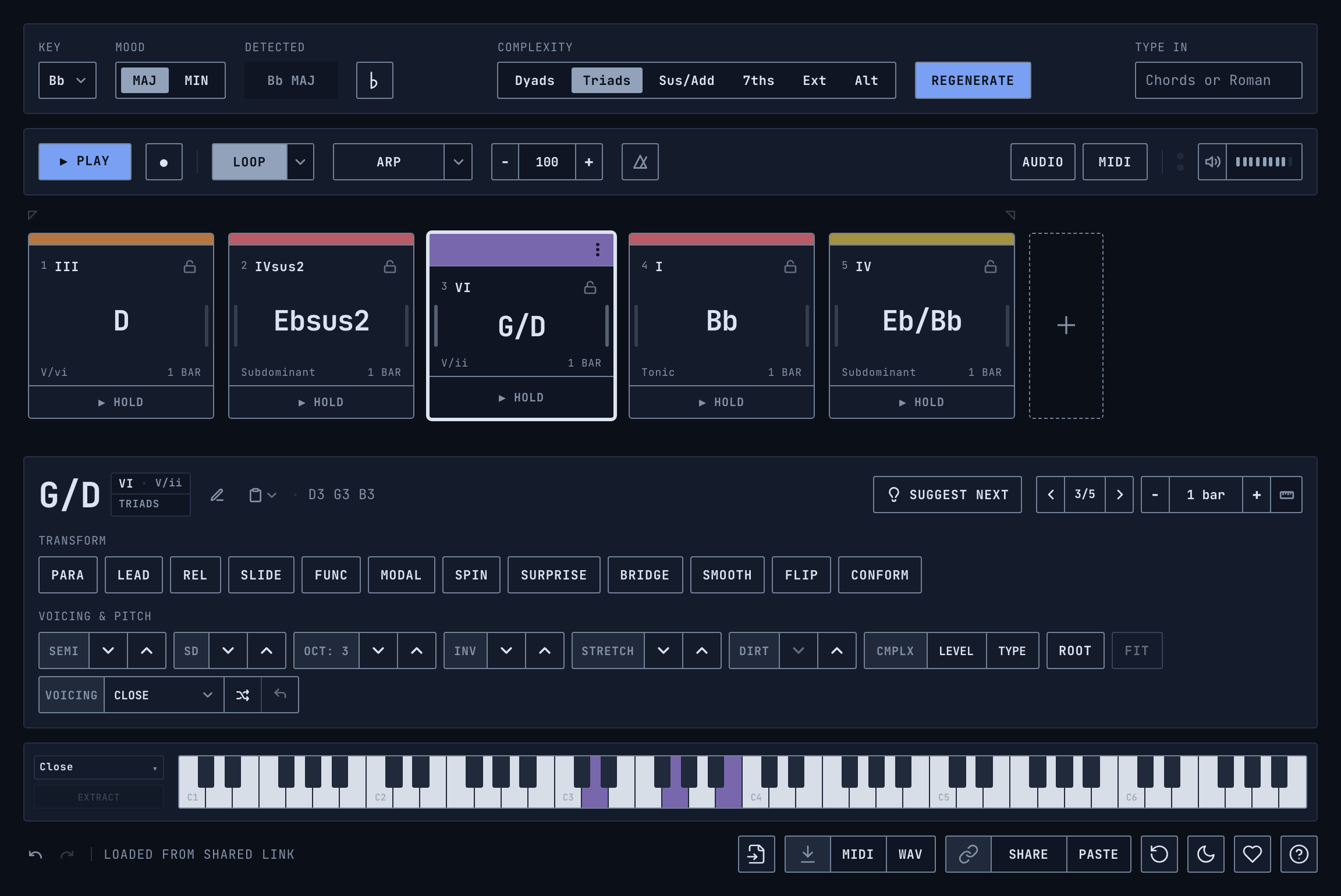
From top to bottom:
- Header - key, mood, detected key, complexity, Regenerate and Type In.
- Transport - play, loop, arpeggiator, tempo, metronome, audio and MIDI settings, volume.
- Timeline - layout of a progression, one card per chord, with the loop brackets above it.
- Inspector - everything that works on a selected chord: Transform and Voicing & Pitch.
- Piano - the notes of a selected chord, plus the voicing controls.
- File bar - import, export, share, reset, theme, support and help.
The header

Key and Mood
Key sets the tonal center and Mood picks major or minor. Together they decide what Regenerate draws from, what the Roman numerals are measured against, and which notes count as being in the scale for Conform, Dirt, Spin and Smooth.
Note. Changing the key locks it, so it stops following the detected key.
Detected
Detected is the key that Midiocre hears in the chords themselves. It is not the same thing as the Key setting, as the chords are being edited, the detected key follows what has been actually written, and it often disagrees with the Key setting. So the key can actually be in C major but the progression is leaning on chords from G major, and the detected key will show that. It’s important to accept the Detected key (apply it) to make the Roman numerals to match.
It is worked out by weighting each note by how long it sounds, not by how many times it appears. So a tonic that sits for two bars anchors the key, and a handful of quick passing chords can’t outweigh it.
The readout changes shape to tell how far apart the two readings are:
- Dimmed, with no border - the two agree. There is nothing to do here, and the readout isn’t clickable.
- A button with a grey dot - they disagree, but every chord still fits the set key. This happens a lot and it’s harmless: C major and A minor share all seven notes, so a progression can lean one way while nothing in it has actually left the key. Adopting is optional - it only changes which key the numerals are measured against.
- A button with an amber dot - the progression is already using chords from outside the key set.
Click the readout in either of the two button states to adopt the detected key and lock it. Note that agreement is the quiet state: when the two readings match, the readout says so by showing nothing at all.
The ♭ / ♯ button next to it switches how accidentals are spelled everywhere on the screen.
Complexity
Complexity is the harmonic vocabulary that the generator draws from. It also sets the limit for what Spin, Func, Modal, Smooth and Scale Degree can produce. It is not a difficulty setting, it’s a pool of chords:
- Dyads – two-note intervals:
5ths (power chords),major and minor 3rds,major and minor 2nds,4ths,tritones, andbare 6th and 7th shells. - Triads –
major,minor,diminished,augmentedandmajor ♭5. - Sus/Add –
sus2,sus4,sus2/4,add9,add11,6,m6,6/9,add♭9andadd♯11. - 7ths –
maj7,m7,dominant 7,m7♭5,dim7,m(maj7),maj7♯5and7sus4. - Ext –
maj9,m9,dominant 9,11thsand13thsof each quality,9sus4and13sus4. - Alt – altered dominants and modal colors:
7♭5,7♯5,7♭9,7♯9,7♯11,7♭13,7♭9♭13,7♭9♯11,7♯9♯11,7♯9♭13,maj7♯11,m7♭9andalt.
Note. The word Complexity shows up twice in the app and means two different things. Here in the header it is global – the pool that every generated chord comes from. The CMPLX buttons in the Inspector work on the selected chord only, and don’t change the global setting. It overrides the global Complexity for that chord (it locally scans through the global Complexity pool of chord qualities).
Regenerate
Regenerate rebuilds the whole progression from the current key, mood and complexity. Anything you locked survives it, see two kinds of lock below. When some chords are locked the button says Regen instead, and only rewrites the rest.
Type In
Type In is the quickest way to enter something already known. Type or paste either chord names, like Cmaj7 F G Am, or Roman numerals, like I IV V vi.
The chords can be separated with spaces, commas, > or →. A lone - is treated as a divider and ignored, so i - bVII - bVI works fine. Typing rest, r or x puts in a rest.
Midiocre reads the whole line one way or the other. If every chord in it is a valid chord name it uses those, and if not, it reads the line again as Roman numerals against the current key. That’s why a mixed line resolves consistently instead of chord by chord.
Pasting from another app works the same way, the field takes whatever is in the clipboard.
Note. There is another type in field - Chord editor panel (opened via the “Pencil” button, T or double-clicking a card) in the Inspector, which edits the selected chord only. This one is for the whole progression.
The timeline

The timeline is the progression itself, one card per chord, read left to right. The loop brackets sit above it, the + slot for adding a chord is at the end, and the thin empty horizontal strip below the cards is where you drag to select several at once.
The chord card
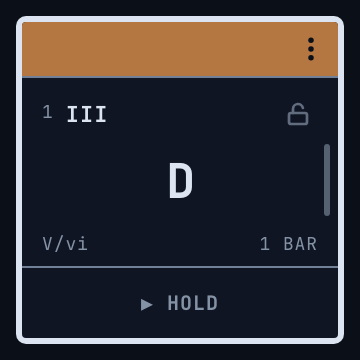
Each card shows:
- Colored header - the quality family of the chord. Click it to select the chord, or press and hold it for half a second to select all of them. The ⋮ menu sits here on the selected card.
- Number and Roman numeral - the numeral is read against the detected key.
- Padlock - whether the chord is locked against Regenerate.
- Chord name - spelled with the accidentals chosen. A slash, like G/D, means the chord is inverted.
- Function - this says Tonic, Subdominant or Dominant when the chord belongs to the key. When it doesn’t, you get its borrowed reading instead: V/vi for a secondary dominant, Borrowed (iv), or just Chromatic when there is no standard reading for it. This line is often more useful than the numeral, because it tells you why the chord fits.
- Length - in bars, or in beats when it isn’t a whole number of bars.
- HOLD - press and hold to hear the chord without starting playback.
Selecting chords
Click a card to select it. To select several, drag across the empty strip just below the cards and a selection rectangle follows the pointer. Clicking that strip collapses a multi-selection back to one card. Press and hold a colored header for half a second to select everything.
From the keyboard, ← and → (left and right arrow keys) step through the chords, Shift + ←/→ extends the selection, Cmd + ←/→ jumps to the first or last chord, and Cmd + A selects all of them.
Most of the Inspector works on the whole selection, so if several cards are selected, a transform applies to all of them at once.
Adding chords
There are four ways to get a new chord onto the timeline:
- The + slot at the end. The + button sitting after the last card appends a chord that continues the progression, drawn from the current key, mood and complexity – the same vocabulary Regenerate draws from. It’s the quickest way to extend a progression you already like, since it picks something that plausibly follows what is already there rather than a fixed default.
- Suggest Next - when you want to choose which chord goes in, rather than letting the algorithm pick. It also inserts in the middle, not just at the end.
- Type In - for writing out a already existing progression, copied or just made up, in one go.
- Duplicate, Split and paste splice - see below.
Whole progressions can also come in from outside, by importing a MIDI file, by MIDI step entry, or by pasting a share link.
A Rest is a card that takes up its beats and makes no sound. Press 0, or use Convert to Rest in the ⋮ menu in a selected card’s header. A rest remembers the chord it used to be, so converting it back gives that chord and not some default one.
Reordering, resizing and splitting
Most of this can be done in two places, on the card itself or in the Inspector. The Inspector also works on several cards at once.
- Reorder - drag a card, or use the ‹ › arrows on either side of the position badge (‹ 2/5 ›) in the Inspector.
- Resize - drag either edge of a card, or use the – 1 bar + stepper in the Inspector, or press
[and]. Lengths are whole beats, and while you drag an edge the preview snaps to the length that will actually be applied, so you can see it before you let go. A card can be anywhere from 1 beat to 16 beats, which is four bars. - Duplicate, Split, Convert to Rest and Delete - the ⋮ menu on the selected card, or
Cmd + D,Cmd + E,0andBackspace. - Join - select adjacent cards and press
Cmd + J.
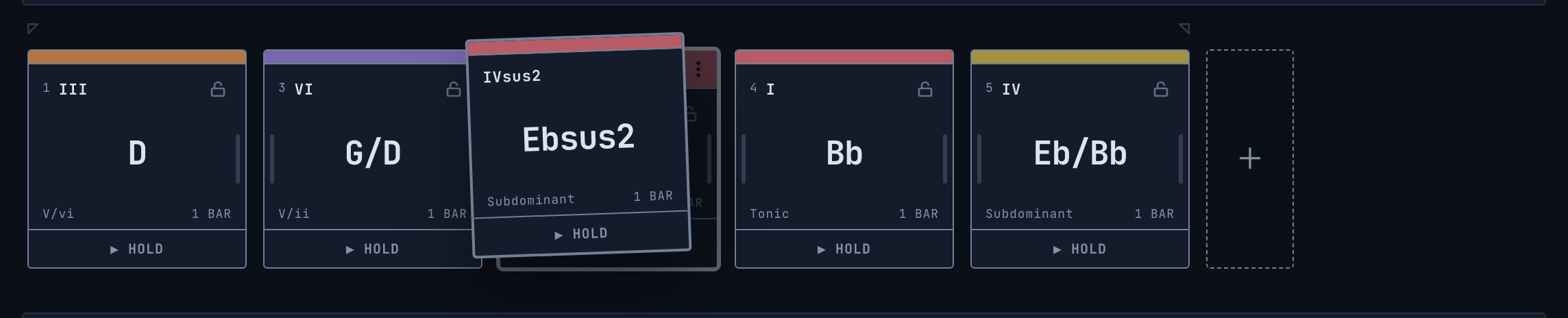
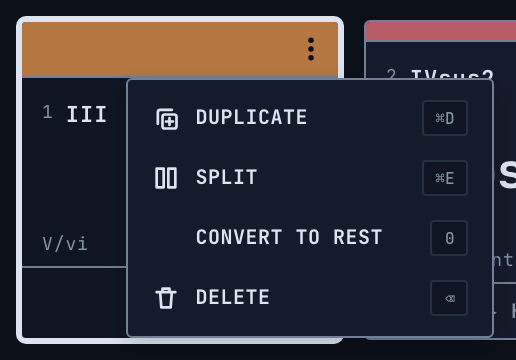
Split cuts a card in half within its own length. You get two chords where there was one, and the progression stays the same length. Join does the reverse, merging adjacent cards back into one.
Both Duplicate and paste splice insert rather than overwrite, so they’re the other way to grow the progression from the middle instead of the end.
Two kinds of lock
Both locks tell Regenerate to keep its hands off, but they are deliberately different:
- Lock chord keeps the card exactly as it is, same chord and same length. It’s the padlock in the top right corner of the card, or press
L. Long-press the padlock to lock all cards at once. Do this again to deselect all chords. - Lock length lets the chord itself be rewritten while the length stays put. There is no button for this on the card – it’s the ruler button in the Inspector, attached to the right of the – 1 bar + stepper, which is the value it locks. Or press
Shift + L. If a card’s length is locked it will tell you so when you hover it.
Locking only the length is how you keep a rhythm that you like and re-roll the harmony over it.
The Inspector
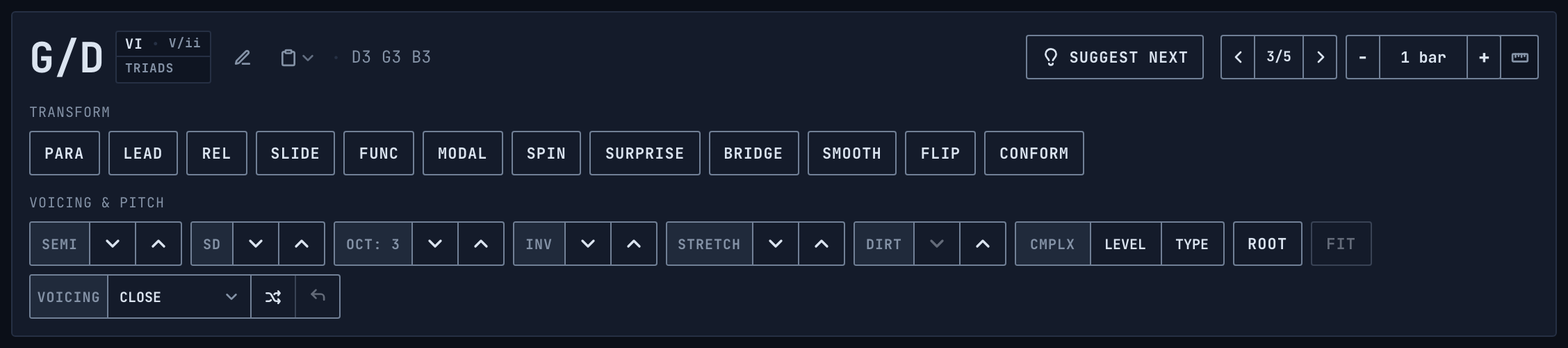
The top line is readouts and editing:
- Chord name, in large type. An approx badge appears next to it when the notes are edited by hand and the name shown is only the closest match to a detected chord.
- Analysis badges - the Roman numeral with the functional reading, and the complexity tier that the chord belongs to.
- Pencil (or press
T, or double-click a card) - opens the chord editor to type a chord name, a Roman numeral, or exact notes likeC4 E4 G4 B4. When you enter exact notes they are pinned as a custom cluster, and the badge next to the field switches between keeping that cluster and snapping to the nearest standard chord. - Note names - the notes the chord is actually sounding, in order.
- Clipboard - cut, copy the name, copy the Roman numeral, paste over the selection, or paste splice, which inserts instead of overwriting.
- Position - ‹ 2/5 › shows where the chord sits in the progression, and the arrows on either side move it earlier or later. They reorder the chord, they don’t change what’s selected, use
←and→for that. - Length - the - 1 bar + stepper, and the ruler button that locks the length.
- Suggest Next - opens the suggestion panel.
Underneath are the two rows that do the actual work, and they are split by what they change. Transform changes which chord the card is. Voicing & Pitch leaves the chord alone and changes how it sounds - which notes, in which register, and how far apart. Except Stretch (described here), which kind of is a transform but we believe it belongs here better - it changes the chord nature and name.
Note. When a control can’t do anything useful it goes dim instead of disappearing, and hovering it tells you why. Bridge will say that it needs a chord on the other side to build towards, Slide will say that the chord has no major or minor third to swap.
Transform

Most of these work on every chord you have selected. Bridge and Smooth are the exceptions, because both of them are defined by the chords on either side, so they take one card at a time. Either way the whole thing is a single undo step.
PARA, LEAD, REL and SLIDE
These four are the ones to reach for when a chord is almost right. They are the Neo-Riemannian transforms. Each one swaps the major or minor third of the chord and moves the root by a fixed amount, which lands you on a closely related chord – for a triad, one that keeps two of its three notes:
- PARA - parallel. Swaps the third, the root stays where it is.
CbecomesCm. - LEAD - leading-tone exchange. The root moves up 4 semitones.
CbecomesEm. - REL - relative. The root moves down 3 semitones.
CbecomesAm. - SLIDE - slide. The root moves up a semitone.
CbecomesC♯m.
Minor chords move the opposite way, which is what makes each of these its own reverse. Press one twice and you are back where you started.
They work on any chord that has a clear major or minor third, not just plain triads – a maj7 becomes an m7, an add9 becomes an m(add9). They go dim for chords with no third to swap: suspended, diminished, augmented, power chords and other dyads, and rests. The inversion carries over, and if you hand-edited the notes those are dropped, since the chord is genuinely becoming a different one.
Func
Replaces the chord with a different one from the active key that plays the same role - another tonic for a tonic, another dominant for a dominant. In G major a G chord can become B minor or E minor, its fellow tonics. The new chord is built at the active Complexity and moved into the same register as the chord before it, and the algorithm keeps trying until the result actually sounds different from what was there.
TIP: Use it when the shape of the progression is right but one chord needs spicing up.
Modal
Borrows a chord from the parallel mode of the active key – from G minor when you are in G major, and from G major when you are in G minor. The tonal center stays where it is and only the mode that the chord comes from changes, which is where a borrowed ♭VII, minor iv or ♭VI comes from. Also built at the active Complexity and moved into the register of its neighbour.
Spin
Jumps to a random other degree of the current key, at the active Complexity. It never gives you back the degree you were already on, so every press is an audible change. Probably the most useful button on the row when you are hunting for a progression by ear.
Surprise
Goes outside the key - that is the point of it, and what separates it from Spin, which stays inside. The root can be any of the twelve.
What it will not do is hand you a chord with no relationship to the ones around it. Every press weighs a batch of candidates and keeps the ones that connect, in either of the two ways a chromatic chord can:
- A shared note. Something is held over from the chord before or after, and your ear follows it.
- Parallel motion. Nothing is shared, but every voice steps by a semitone or so.
CtoD♭has no note in common with C at all, and it is still one of the oldest moves there is.
Connecting to one side is enough. A chord that slides out of the one before it is worth having even when the chord after it is a leap – that leap is often the point.
Then it picks at random from whatever survived. The randomness decides which good chord you get rather than whether you get one, so pressing it repeatedly is the way to use it; it will not repeat its last few answers on the same card.
The surprise is in the root, not the quality. C to F♯ major is startling on its own without also being an exotic chord type, so the everyday qualities come up most often.
Surprise still respects your Complexity setting. Most of the time it outputs a chord from that same Complexity level. But about one in four times, it goes one step further, meaning a stray Seventh on a Triads” progression, a stray Extensions on a Sevenths one. Enough to keep things interesting but not enough to pollute the progression with noise.
Bridge
Turns the selected chord into a passing chord or a secondary dominant that connects the two chords around it. It needs a chord on both sides and works on one card at a time. Compare Smooth, which solves the same problem by least motion instead of by function.
What it builds depends on the distance between the two neighbours:
- A whole step up (
CtoDm) - a chromatic diminished 7th in between, soC♯dim7. - A whole step down (
DmtoC) - the same thing, a semitone below the first chord. - A half step up (
EtoF) - a dominant 7th on the root of the first chord,E7going toF. - A half step down (
FtoE) - the secondary dominant of the next chord,B7going toE. - The same root (
CtoCm) - a dominant pivot, the major chord a fifth above. - Three semitones or more - the secondary dominant of the next chord.
- One neighbour is a rest - the dominant 7th of whichever neighbour is a real chord.
It then picks the inversion and octave whose average pitch sits closest to halfway between the two neighbours, so the connecting chord turns up in the same register as the music around it instead of jumping somewhere else.
Smooth
This is the least-motion counterpart to Bridge. Where Bridge inserts a functional chord no matter how far the notes have to move, Smooth looks at every diatonic chord of the key at the active Complexity and picks the one whose notes move the fewest semitones from both neighbours. Notes that the chords have in common cost nothing.
Flip
Negative harmony. Every note is mirrored around the axis of the key, and the result is then read back as a chord and moved into roughly the register the original sat in. G becomes Fm, Am becomes E♭. The voicing, any Dirt notes you added and the lock state all survive the reflection.
TIP: Accept the key if the Detected differs from the Set key first if you want the axis to stay put while you work.
If you have everything selected, Flip mirrors the whole progression and also locks the key and swaps the mood. That way pressing it twice brings you back exactly where you started instead of drifting.
Conform
Snaps every out-of-scale note to the nearest note in the scale. When a note sits exactly between two scale notes, Conform tries both. Out of all the combinations it prefers, in this order: one that makes a real named chord, then the more idiomatic chord type, then the smallest change in average pitch - that last one is there so that using Conform repeatedly doesn’t slowly crawl the chord up or down the keyboard.
An action that would collapse two notes onto the same pitch is rejected even if the result would be a valid chord name, so the chord keeps the number of distinct tones it started with.
The button goes dim when the chord already fits the scale.
Voicing & Pitch

Every stepper here works on all the chords you have selected. None of them changes which chord you have, apart from CMPLX, which is on this row because it changes how dense the chord is rather than what its root is.
- SEMI - transposes the chord chromatically, one semitone at a time. Also
Alt + ↑/↓. - SD - moves the chord one diatonic scale degree inside the key, and picks the chord type that belongs on the new degree. Also
Cmd + Shift + ↑/↓, or press1to7to jump straight to a degree. - OCT - moves the chord an octave, and the readout shows which octave you are on. Also
Alt + Shift + ↑/↓. - INV - cycles through the inversions of the chord. Also
Cmd + ↑/↓. - STRETCH - expands or contracts the spacing of the notes relative to the bass note.
- DIRT - adds or removes extra diatonic notes around the edges of the chord.
- CMPLX - LEVEL moves the chord up to the next complexity tier while keeping its quality family, and TYPE cycles through the chord types inside the current tier. This is the per-chord control, not the global Complexity in the header. It of overrides the global Complexity for selected chord(s).
- ROOT - puts the chord back into root position and back onto the global voicing. It goes dim when the chord is already there.
- FIT - re-voices the chord for smooth voice leading.
A few of these are worth explaining properly.
SD keeps the density of the chord where it can. If SD moves a 13th chord onto a degree that has no 13th available it steps down to an 11th or a 9th rather than collapsing all the way to a triad, and it remembers the tier it came from, so moving back gives the fuller chord again.
OCT stops rather than quietly mangling the chord. Octaves run from 0 to 8, but that doesn’t guarantee the chord fits into MIDI – a 13th chord on B at octave 8 would need a note above the top of the MIDI range, so a move that would push a note out of range is simply refused.
STRETCH moves in steps of 0.25 between 0.5× and 2.0×, and on top of that it is limited per chord to the range where its own notes won’t collide. A wide voicing runs out of room to contract before a close one does. The tooltip tells you when you have reached either end.
DIRT thickens a chord that sounds too clean. Each press adds one random note from the key near the existing range of the chord, within four semitones above the top or below the bottom, and:
- it stops at 8 voices;
- it stays inside MIDI notes 40 to 88, so roughly
E1toE6; - below
C3it won’t place a note within three semitones of an existing one, so the low end doesn’t turn to mud.
Removing Dirt goes in reverse order. Each press of the down arrow takes back the note you added most recently, until the chord is exactly as clean as it started.
FIT picks the inversion and octave that move the least from the chord before it. On the first chord it wraps around and fits against the last one. If you have the whole progression selected it optimises the voice leading left to right across everything at once. It goes dim when there is nothing left to improve.
Note. Fit and Smooth sound similar but they are not. Fit keeps your chords and changes their register. Smooth replaces a chord with a different one that happens to move less.
Voicings and the piano

A voicing is how the notes of a chord are spread across the keyboard, as opposed to which chord it is. The piano shows the notes of whichever card is selected. If part of the chord sits outside the range shown, a note tells you how many notes are hidden – they still play.
The built-in voicings
Each one is a rule applied to the notes of the chord, sorted from low to high:
- Close - nothing, the chord in its tightest position.
- Drop 2 - takes the second note from the top down an octave.
- Drop 3 - takes the third note from the top down an octave.
- Spread - pushes the middle note up an octave, which opens a gap in the center.
- Open - pushes every other note, starting from the second from the bottom, up an octave.
- Guitar - fretboard-style spacing. Keeps the root and fifth low, lifts the third to the top and doubles the root an octave up.
- Shell - keeps only the root, the third or the suspension, and the sixth or seventh. Drops the fifth and the filler.
- Root + Octave - adds the root again above the top note.
- Just Bass - keeps only the lowest note.
Note. The voicings that need at least three notes leave a two-note chord alone.
Global voicing and card voicing
The selector next to the piano is the global Performance Voicing, and it applies to every chord at once.
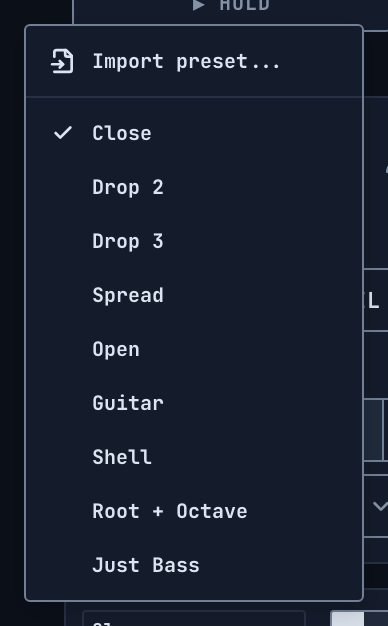
A single card can opt out of that. Revoicing one card with the shuffle button in the Inspector, or picking a voicing for it in the Inspector’s own VOICING selector, detaches that card - it keeps its own arrangement and stops following the global (“performance”) control. Follow Global, the back-arrow button in the Inspector, lights up whenever the selected card has detached, and attaches it again. The global voicing selector next to the piano turns italic once any card has detached, and its tooltip names how many cards are bypassing it.
Your own presets
Arrange a chord the way you want it and press EXTRACT to save that layout as a preset, named USER 1, USER 2 and so on. Your presets show up in the voicing menu next to the built-in ones, they survive a reload, and they travel inside a share link.
Extract goes dim when there is nothing new to save, which is when the layout of the chord already matches its preset. It also needs a single chord selected.
The same menu has Import preset… and Export preset, which move your whole preset library between machines as a midiocre_voicings.json file, and Delete Presets, which clears the custom library. It asks twice before it does.
Suggest Next
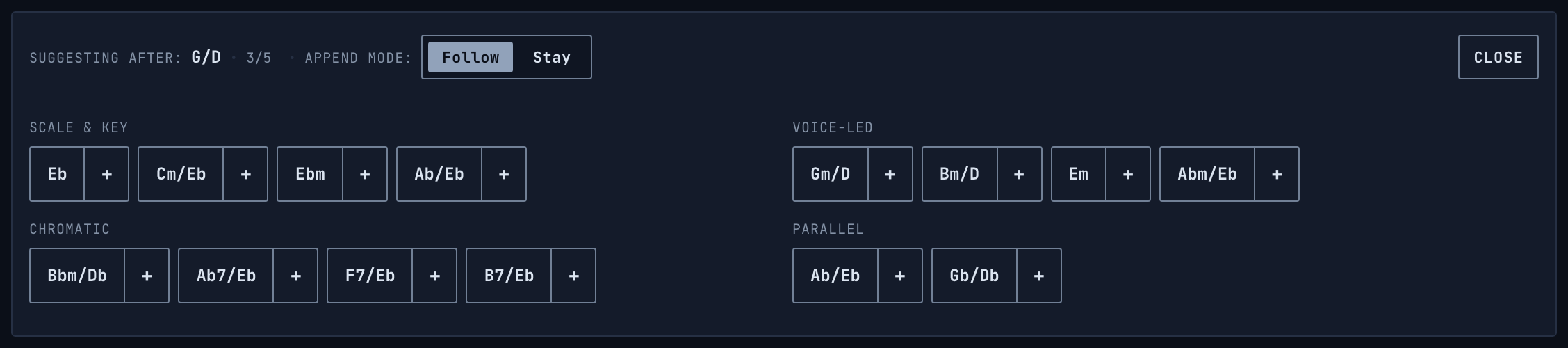
Suggest Next offers you chords that could plausibly follow a given point in the progression, grouped by where they come from. It’s the fastest way to build a section - you can write a whole one from this panel and then refine it with transforms. Open it from the Inspector, or see adding chords for the other ways in.
The header tells which chord it is suggesting after, and its position. Every chip is split in two. Press and hold the name to hear the chord without adding it, and click the + to add it.
Hover a chip and it tells which technique produced it. The chip itself shows the chord, while the tooltip tells you what it is, like Chromatic Mediant, Tritone Substitution or Parallel (P).
The suggestions are worked out from the chords on both sides of the insertion point, so a suggestion for the middle of a progression takes into account what comes after it as well as what came before. At the end of the progression, “what comes after” wraps around to the first chord, so the suggestions help the loop turn over. Anything identical to one of the immediate neighbours is filtered out before you ever see it.
Note. Each group scrolls sideways when it has more chips than fit.
Scale & Key
Chords from inside the key, labelled with their Roman numeral. Two of them are the diatonic chords whose move from the previous chord is strongest, ranked by the same transition weighting that the app’s own chord analysis uses, so they aren’t shuffled. The other two are the borrowed iv and ♭VII, the two most used chords from the parallel mode - the same pool that Modal draws from.
All of these are built at the active Complexity, so at 7ths this group offers you sevenths.
Voice-Led
The four Neo-Riemannian moves applied to the chord before the insertion point – Parallel, Leading-Tone, Relative and Slide. These are the closest relations there are, each one keeps two notes out of three. When the previous chord has no clear major or minor third this group is empty, rather than showing you chords that the transforms can’t actually produce.
Chromatic
This is where the functional and borrowed moves live, and it’s worth knowing that some of these appear all the time and some only turn up when they make sense.
These are always there:
- Chromatic Mediant - the chord a third away, keeping the same broad major or minor character.
- Mixed-Mode Mediant - the same move a third away, but with the quality flipped. It shares one note with the chord you have and lands on a completely different center.
- Backdoor Dominant -
♭VII7, resolving up into thetonic. - Secondary Dominant - the
V7of the next chord. - Tritone Substitution - the
♭II7of the next chord, the tritone twin of that dominant.
And these two only show up under certain conditions:
- Deceptive Resolution - you only get this one when the chord before the insertion point is genuinely acting as the dominant. If nothing is set up to resolve, there is nothing to resolve deceptively, so the chip stays away instead of offering a cadence that isn’t there.
- Phrygian Half-Cadence - minor keys only. It’s the minor-key
ivwith its half-step bass pull intoV. In a major key the same chord is just the borrowediv, which the Scale & Key group is already offering, so there is no point in showing it twice.
Both mediant chips choose between the four possible chords a third away by looking at which one shares the most notes with the chord that follows. That’s a real voice-leading criterion, and it is decided the same way every time rather than at random.
Parallel
Planing - the same chord shape moved up or down a semitone, both directions.
Follow and Stay
- Follow moves on after each added chord and suggests from the new position.
- Stay keeps suggesting from the same spot, so several alternatives (or valid continuation chords) are added one after another.
Playback

- Space starts and stops. The tempo is available from 40 to 240 BPM - drag the number to scrub it, or click it to type. In the desktop version the mouse wheel also controls it.
- Metronome,
Shift + M, clicks quarter notes. - Volume,
M, mutes, and double-clicking the volume meter resets it to 0 dB. In the desktop version the mouse wheel also controls it.
There are four settings panels that take over the transport bar in place.
- AUDIO and
- MIDI open from their own buttons, while
- LOOP and
- ARP are toggles with a ▼ next to them that opens the panel.
Play, MIDI arm and the volume control stay exactly where they are while a panel is open, so you can still start playback and change the level in the middle of editing. CLOSE takes you back.
Loop

Drag the brackets above the timeline to set the loop range, or drag the middle to move the whole region. The LOOP button turns looping on and off, and its ▼ opens the settings:
- SELECTION - set the loop to the chords you have selected. Also Cmd + L, and pressing it again on the same selection clears it.
- RESET - loop the entire progression.
- CROP - delete every chord outside the loop range.
- DISABLE - ignore the brackets and loop everything.
Disabled (hollow) brackets show the loop range but don’t actually loop the portion of the progression, but the LOOP toggle is still active and loops the whole progression. There are no brackets visible when the LOOP toggle is off.
Arpeggiator

The arpeggiator breaks the chords into a played pattern instead of sounding them as blocks.
- Rate - 1/2, 1/4, 1/8, 1/16 or 1/32 notes.
- Timing - Straight, Triplet, which is 3 over 2, or Dotted, which multiplies the durations by 1.5.
- Pattern - Up goes from the lowest note to the highest, Down the other way, Up/Down cycles both ways and Stack plays the notes together as rhythmic stabs.
- Retrigger - the pattern restarts on every chord change. Turn it off and the arpeggio plays in Free-Run, where the pattern keeps cycling across the card changes without restarting the pattern.
Synth tone

Two controls, both going from 0 to 100.
- ENVELOPE sets the decay, sustain and release of the synth together, so short for stabs and long for pads.
- TONE opens or closes the filter, low is mellow and round, high is brighter and edgier, with more open filter, resonance and harmonics. Drag vertically to scrub, or double-click to type a value.
Note. These are playback settings only. They don’t travel in a share link and they have no effect on exported MIDI.
MIDI

MIDI hardware
Pick an output device and your external synth plays along with playback, with auditioned chords and with the MIDI trigger. The output channel can be any of 1 to 16, and a small LED lights up while notes are being sent.
Input has three modes:
- OFF - incoming notes do nothing.
- STEP - step entry. The chords you play are written into the timeline one card at a time, like a typewriter. Press R to arm it from the keyboard. It’s another way to add chords.
- TRIG - trigger playback. Your MIDI keyboard plays the cards you already have, mapped chromatically upwards from C3, so card 1 is C3, card 2 is C♯3 and so on.
The input channel can be filtered to one channel or left on Omni (All).
On the web this uses your browser’s Web MIDI support. Chrome and most Chromium-based browsers have it, Firefox is tested to have it too, Safari doesn’t. If no devices turn up, that’s usually the reason. The desktop app has MIDI built in and doesn’t care which browser you otherwise use.
Importing a MIDI file
Midiocre reads block chords, not lines. Import turns a .mid file into cards using these rules:
- Notes struck within about 150 ms of each other count as one chord, so a strummed guitar chord comes in as one card and not six.
- Notes that are still sounding when a new chord is struck are counted as part of it, so pedal points and held common tones read correctly.
- The *drum channel is ignored.
- Loose human timing is quantised to the nearest half beat, so a chord played slightly early or late still lands where it belongs. Card lengths are limited to between 1 and 16 beats.
- A gap of real silence of two bars or more becomes a rest card. Shorter gaps are treated as staccato phrasing and left as part of the chord’s own card.
- Repeated chords stay as separate cards instead of merging into one long one.
- A voicing that matches the standard arrangement of the chord will follow your global voicing control afterwards, while a genuinely unusual voicing keeps its exact spacing.
Important! Files that are not chords are declined, with the reason in the status line, rather than imported as nonsense:
- A melody - one note at a time, three notes or more.
- An arpeggio - never more than two notes struck together, four or more attacks, and no more than four distinct pitch classes in the whole file. A progression of dyads like
C5 A5 F5 G5also strikes two notes at a time, but it ranges over six pitch classes, so it imports fine. - A single sustained note, or a single power chord, is not declined. Those are valid cards.
Note. A melody played on top of chords is not separated out. Its notes fold into the chord underneath them and the chord names change accordingly. For the cleanest import, use a file where the chords are struck on the beat, with the melody removed or on its own muted track.
Exporting
MIDI writes a standard .mid file of the progression, and WAV renders the audio losslessly as .wav.
In the desktop app both open a save dialog, so you choose where the file goes and under what name. In the browser they download the way any other file does.
Saving and sharing

Your work is kept in your browser, or in the app, and restored when you come back. Nothing is uploaded and there is no account.
SHARE copies a URL that carries the whole session – the chords, key, mood, tempo, locks, per-card voicings, the global voicing and your custom presets. The progression is encoded in the link itself, nothing is stored on a server. PASTE loads a link from your clipboard.
Since the link is the whole session it doubles as your backup and transfer format. Copy it to save your work, or to move it to another device. A link copied in the web version of Midiocre can be used in Desktop, and vice versa, so it’s easy to share, collaborate and save your work.
Note. A few playback-only settings are deliberately left out and come up at their defaults on the other end: the loop range, length locks, accidental spelling, the arpeggiator rate and timing, and the envelope and tone of the synth. A rest arrives as a rest, without the memory of the chord it used to be.
Reset clears the progression and starts fresh. It asks twice - press it again within three seconds to confirm.
TIP. If you want to copy only the chord names and not the whole app state,
- select the cards you want to copy and copy them (either via the Clipboard menu in the Inspector or via shortcuts), the chords’ names are copied as text;
- use
Cmd + Alt + Cto copy the the whole progression asroman numerals; - use
Cmd + Shift + Cto copy the whole progression aschord names; - go to Type In (
Shift + T) and copy the text from there, which is just the chord names in a single line already conveniently selected.
Keyboard shortcuts
The list of shortcuts can also be found inside the app, under Help & About ▸ Keyboard Shortcuts, shows the keys for your own platform.
Note. The editing, clipboard, transform and locking shortcuts act on every chord you have selected, not just one. Select five cards and Cmd + E splits all five, L locks all five, and the whole thing is a single undo step. Where a shortcut is deliberately single-chord, it says so below.
Playback
Space- play or stop.EnterorP- audition the selected chords, for as long as you hold the key.M- mute or unmute.Shift + MorK- metronome on or off.R- arm MIDI step input.
←/→- previous or next chord.Shift + ←/→- extend the selection.Cmd + ←/→- jump to the first or last chord.Cmd + A- select all.
Cmd + Z- undo.Cmd + Shift + Z- redo.Cmd + Enter- regenerate, keeping the locked chords.Cmd + D- duplicate the selected chords.Backspace- delete the selected chords.Cmd + E- split the selected chords.Cmd + J- join the selected chords, which must be adjacent.T- open or close the chord editor (“Pencil” button in Inspector). One chord at a time.Shift + T- jump to the Type In field.Cmd + Alt + R- reset the progression, twice within three seconds.
Clipboard
Cmd + C- copy the selected chords.Cmd + X- cut the selected chords.Cmd + V- paste over the selection.Cmd + Shift + V- paste splice, which inserts instead of overwriting.Cmd + Shift + C- copy the whole progression.Cmd + Alt + C- copy the Roman numerals of the selected chords.
Transform – all of these apply to every selected chord
Cmd + ↑/↓- invert up or down.Alt + ↑/↓- transpose by a semitone.Alt + Shift + ↑/↓- transpose by an octave.Cmd + Shift + ↑/↓- transpose inside the key.1to7- set the scale degree.0- toggle rest.[/]- shorten or lengthen by one beat.
Locking and loop
L- lock the selected chords against regeneration.Shift + L- lock the length of the selected chords.Cmd + L- loop the selection, and again to clear it.
Help
?orF1- open Help & About.
FAQ
No MIDI devices in the list.
On the web your browser probably has no Web MIDI support. Use a Chromium-based browser, or the desktop app. See MIDI hardware.
A transform button is greyed out.
It can’t do anything to what you have selected. Hover it and the tooltip says exactly why. Usually it’s either the wrong kind of chord – the Neo-Riemannian moves need a major or minor third – or the wrong position, since Bridge and Smooth need a chord on each side and work on one card at a time.
A chord shows an approx badge.
Its notes were edited by hand and no standard chord matches them exactly, so the name you see is the closest reading. It’s a label, not a problem. See
the Inspector.
The Roman numerals aren’t what I expect / what I copied.
They are read against the detected key, not against the Key setting. When the two disagree the Detected readout says so -
click it to adopt the detected key, or lock your own by choosing it from the Key dropdown and Mood toggle.
My MIDI file was declined on import / The imported file looks wrong.
Midiocre reads block chords, not melodies or arpeggios. See importing a MIDI file for what it accepts and why.
I changed a chord’s voicing and now the global voicing selector doesn’t affect it.
That card has detached on purpose. Press Follow Global (curved left arrow looking icon) to reattach it, see global voicing and card voicing.
Get in touch if you still have questions.
Privacy
Midiocre collects nothing. No accounts, no cookies, no analytics, and the app makes no network requests of its own. Your progressions never leave your device, there is nowhere for them to go. See the privacy policy for the details.